AI-301Feature · Nia, the AI assistant
Tell Nia what to change. Review it. Apply it.
Describe a change in plain words, add a photo or a sketch if it helps, and Nia proposes it as a list of changes you can tick, see before and after, and apply. Ask it to measure too: tiles, paint, cable and whether a room is big enough.
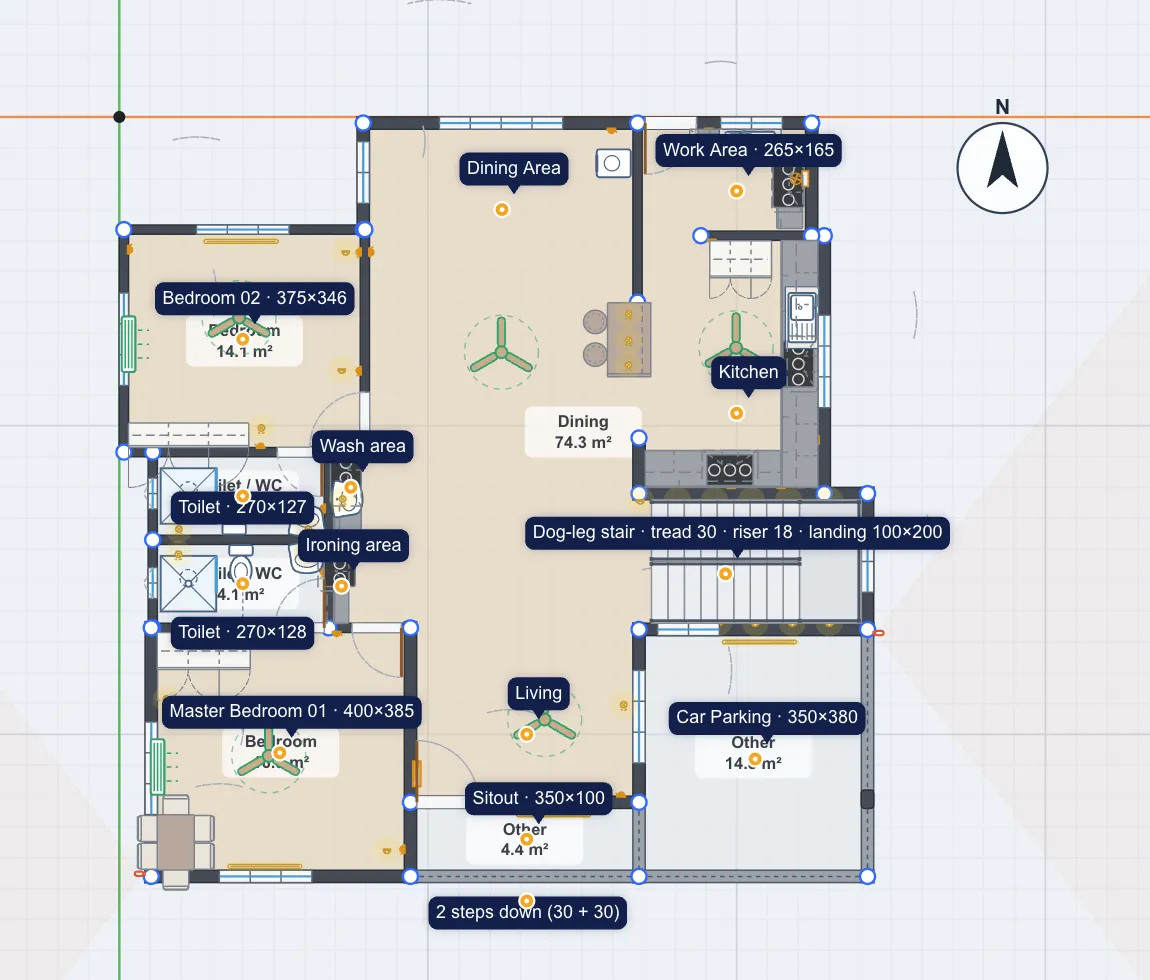
Make the master bedroom 60 cm wider and give it a fan and two more sockets.
Nia · 4 changes. Ticking one ticks what it needs.
4 of 4 ticked · nothing applied yet
Try it: untick a change and the ones that need it untick too
Say it,see it
Most changes to a house plan start as a sentence: make the bedroom wider, add a socket by the bed, move the stair. Drawing each one takes clicks and know-how. Nia turns the sentence into the edit, and shows you exactly what it would change before anything touches your plan.
AI-301.2How it works
From the first wall to the finished plan
01
Ask in your own words
Open Nia from the top bar, the Nia tab on the right or Quick access (⌘K). Describe the change, or attach up to four photos or sketches. Starter prompts under "Change the plan" and "Ask about it" show what it can do.
02
Review every change
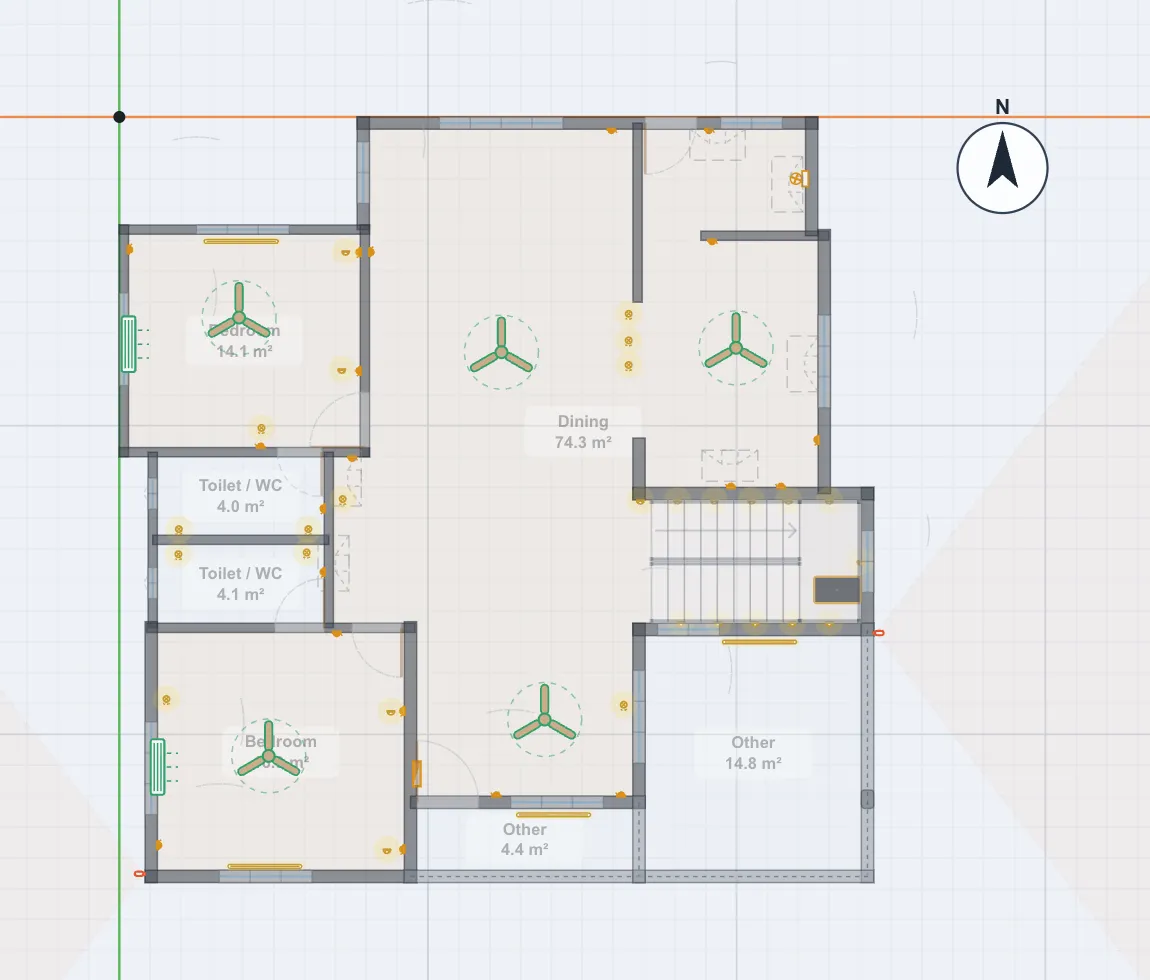
Nia answers with a proposal: one card per change with a tick box and the before → after values, and a before/after plan you can enlarge. Ticking a change ticks what it needs; unticking one unticks what builds on it.
03
Apply, or ask again
Nothing reaches your plan until you press Apply, and undo works as usual. Not quite right? Tell Nia what to change about the proposal and it revises it.
04
Measure with the working shown
Ask how much tile, paint or cable a job needs. Nia measures the rooms and walls in the model, counts the items and shows its working, the way a quantity surveyor would.
AI-301.3What you get
- Plain-language edits
- Walls, doors, windows, furniture, lights and devices, room names and uses, Auto design for a room, or deleting things.
- You approve every change
- Tick boxes per change, before → after values and a plan preview. Nothing is applied until you say so.
- Pictures welcome
- Attach up to four photos or sketches to show what you mean.
- Quantities on request
- Tiles, paint, Cat6 and coax runs, floor and wall areas, worked out from the model with the arithmetic shown.
- Stays on your house
- Nia answers questions about building and the plan. Off-topic requests are declined before they use your monthly allowance.
- AI renders and import
- Turn the 3D view into a photoreal render, or let AI read your PDF and photo drawings into walls and rooms.
AI-301.4From the sample house
Questions Nia answers from the sample house
The Two-storey sample house has 2 storeys, 15 rooms and 3,056 sq ft. These are the kinds of questions Nia answers from it, measured from the model rather than guessed.
“How much Cat6 do I need for the home office and the TV points?”
Home runs from the network point, plus wastage, rounded up to 305 m boxes.
“How many tiles for the bathroom walls, leaving the top 30 cm?”
Wall area per bathroom less the doors and windows, then tiles and boxes.
“How much paint for the bedrooms?”
Wall and ceiling area per room, two coats, in litres.
“Is the kitchen big enough for a fridge, a hob and a breakfast counter?”
The room's size and clearances, with the working shown.
AI-301.5Compared with how it's usually done
Making a change
- Doing it by hand
- Redraw it yourself
- A general AI chat
- Describes it; you redraw it
- Nia in Nuvie Planner
- Edits the plan, after you approve
Checking the change
- Doing it by hand
- Compare prints
- A general AI chat
- Trust the reply
- Nia in Nuvie Planner
- Tick boxes, before → after, a preview
Quantities
- Doing it by hand
- Measure and add up
- A general AI chat
- Guesses from a description
- Nia in Nuvie Planner
- Measured from your model, working shown
Undo
- Doing it by hand
- Rub it out
- A general AI chat
- Not applicable
- Nia in Nuvie Planner
- One undo, like any edit
AI-301.9FAQ
Questions people ask
Which AI does Nia use?
Nia runs on Claude, ChatGPT or Gemini, whichever Nuvie has set up. Where more than one model is available you can pick it in the Nia panel.
Can Nia break my plan?
No. Nia only proposes. You see each change with its before and after, untick what you don't want, and nothing changes until you press Apply. Undo works as usual afterwards.
What can Nia change?
Walls and openings, furniture, lights and electrical devices, room names and uses. It can also run Auto design for a room and delete items.
Is Nia on the free plan?
Nia, AI renders and AI drawing import are on paid plans, each with a monthly allowance. See pricing for what each plan includes.
Does a declined question count against my allowance?
No. Requests that aren't about your plan or building - code, role-play, general trivia - are declined before any AI call is made.
Can I send it a photo of a sketch?
Yes. Attach up to four images with your message: a sketch, a photo of a room, or a reference you like.
Start with the room you're standing in.
Draw one wall and the rest follows. Your first plan takes minutes, and it's free.